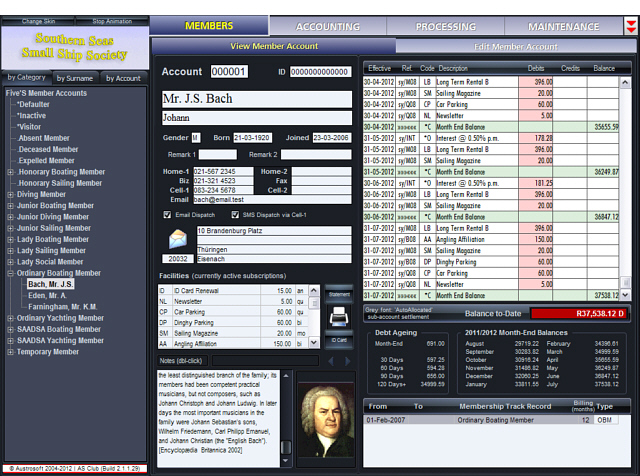
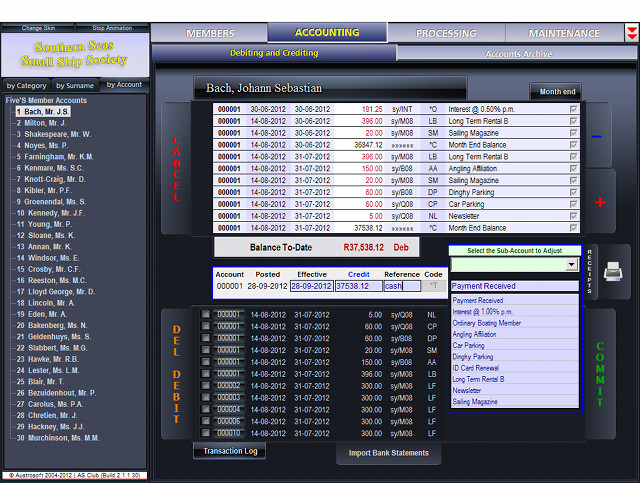
AS Club screenshots (click to enlarge)
- automates the maintenance of member accounts and supports electronic communications with members through email and SMS
- flexible: scheduled debiting of fees to member accounts annually, biannually, quarterly, monthly, and daily (visitors). Automatic debiting to any number of sub-accounts, in any combination of time intervals
- on account settlement, AutoSplit and AutoAllocate intelligently distribute lump sum payments among club sub-accounts, aiding automatic account settlement from electronic bank statements
- automatically handles 'members in arrears' by recategorizing / reinstating them
- handles changes in the debiting schedule automatically: adjustments are posted as required and highlighted in reports
- automates the dispatch of the 'statement of account' to the email accounts of members; mass-emails documents and attachments Bcc-style
- sends out notes, reminders, invitations, etc. as texts to member's mobile phones; personalized messages are composed on-the-fly from static text and variable data drawn from the database
- imports payments from electronic statements provided by banks in MS Money format automatically, dispensing with error-prone manual data capture
- intuitive graphical user interface for speedy navigation between the various program sections
- acquires member portraits from a number of sources, incl. web cam and flatbed scanner, and uses them to print high-quality ID cards on paper or PVC, and optional 'thumbnail' pictures on member reports
- ID cards feature barcodes which can be read by simple webcams and are used to automate database navigation
- integrated one-click, 12-slot database backup/restore
- automated system maintains 7 generations of backup copies of the AS Club database on the Austrosoft web server
- attractive graphs show statistical data at a glance (see screenshot on the right for an example)
- Visitor category: one-click suspension / reactivation of accounts without loss of data; one-click, up-to-date statement printing at visitor's departure
- integrated one-click error reporting: suspect database can be transmitted via email in compressed and encrypted form to Austrosoft for diagnosis
- new AS Club releases and updates are automatically delivered via Internet download and installed on your computer - you are always running the latest version of the software
- 'Skins' emulate the Windows 7 'Aero' experience on Windows XP
- and much more...
The installation of AS Club is simple and follows the usual setup procedure
of the Windows OS.
AS Club updates are delivered automatically to licensed
users. To install AS Club:
•
download the AS Club Setup package by clicking on the
download link.
Internet browsers ask whether to Open or Save the
file.
• select Save and preferably point to your desktop as destination
• once the download is complete (this may take a few minutes), you should
find the AS Club file (named AS Club_setup.exe) at your chosen download
location
• double-click the AS Club icon of your download: this will either install the
software for the
first time or automatically upgrade an existing
installation.

Minimal and Recommended System Specification
Windows XP / Vista / 7 / 8 / 8.1 / 10 / 11+
x86 / x64
Display:
minimal vertical screen resolution 768p
Recommended monitors: 1366x768p, 1600x900, 1280x1024, 1920x1080
Minimal RAM size: according to Windows OS specification
Minimal recommended HDD/SSD space: 80 MB
Trial period: 2 months (ending on the last day of the month following
the month of installation)
• V.2.2.4.141 screen display widened to 1280x768p
• V.2.2.4.132 full online reinstallation of the app
• V.2.2.4.48 downloads now via HTTP (changed from FTP)
• one-click online installation of the latest system
version
from the AS Club Home-page
• one-click synchronization of the accounts database
with
online mirror supports multi user operation
• added alternative phone number format with 10+1 digits
(Yachting Association of India request)
This is the latest complete release of AS Club, suitable for first-time and upgrade installations; the latest partial update is automatically downloaded and installed by AS Club if a suitable internet connection is available
(~ 29 MB)
(PDF-format)
|
AS Club-releases: when to upgrade? As a rule, all full installation packages of AS Club are 'stable' versions of the software, i.e. they have been run as updated versions for some time in a productive setting before they are released. Updates fix known issues and add new functions to AS Club. They are downloaded automatically, provided you are a licensed user and an internet connection is available. AS Club checks the Austrosoft updates server at certain time intervals for program upgrades and installs them as they become available. You can also check the availability of updates manually by clicking button Download Updates on page MAINTENANCE > Database > Administration, tab Updates/Setting Up. Please note that a valid maintenance contract is required to qualify for updated AS Club versions, whether downloads are initiated manually or program-controlled. |
Update History
(unreleased internal versions
are not listed)
02-Feb-2026 AS Club 2.2.4.252
• maintenance release
15-Sep-2022 AS Club 2.2.4.171
• maintenance release
04-Apr-2022 AS Club 2.2.4.161
• graphical user interface (GUI) upgraded: main AS Club
window widened by 25% to 1280 pixels (height 768p)
• month-end processing changes: the "*Inactive" category has been
dropped, "*Defaulter" processing has been
streamlined (for reduced disk activity)
• tax invoice printing: new one-click date boundaries
• full online reinstall: does now a complete wipe of the system before
installing a new version
18-Dec-2021 AS Club 2.2.4.140
• phasing-in of new member accounts, using proportional
daily charges calculated from long-term fees
• surname-based accounts archive look-up and reopening of archived
accounts in one step
• improved report printing
• substitution of Austrosoft SMTP server address
• multiple bug fixes
12-Jun-2021 AS Club 2.2.4.121
• maintenance release
20-Mar-2021 AS Club 2.2.4.114
• updated web-services module
• archived accounts are now exempt from support & maintenance
fees
• overhaul of the *Visitor-category: program adds daily charges at checkout
• page Accounting: a Checkout Panel pops up for accounts in the
*Visitor category
• bug fixed in the 'Undo transaction' mechanism
• the opening of a New account begins now with selecting a membership
category (on right panel)
• sub-account administration: it was possible to enter an empty Legend-field (fixed)
• added to the validation of filenames asssigned to backup sets (when scanning for
'Windows reserved characters')
• message "you have 5 minutes to close AS Club..." removed (after
an update was downloaded)
• a sporadic error could occur when Cancel was issued while opening a New member
account (fixed)
• Accounting page: a click
close to the right edge of Commit was not registered (due to the
button moving left - fixed)
• AS Club launcher form (asgo.exe) redesigned; a possible timing problem fixed
• SMS filter selection (page Send SMS): 2 CheckBoxes replaced with 3
RadioButtons
• the Show-buttons of SMS that exceed 160 chars are now marked with
yellow pointers
• dropped month-end flag: "Include Current Month" (could result in data error
under exceptional circumstances)
• AS Club launch on systems with 16-bit colour setting (instead of 32-bit) is
no longer possible (caused false colours on ID cards)
• a new demo database is being supplied with 'full' installations of AS Club
(with different 'members' and an image for each)
• portrait photographs supplied with new demo database now automatically
deleted as soon as user sets up own database
• modified name validation on entry: 'van' and 'von' can now be part of
surname (thus creating a lower case 'v' group on nav-panel)
• max. parallel FTP connections reduced from 8 to 6 (the number is limited by
FTP-server configuration settings)
• a possible program freeze, caused by a hanging parallel comms-thread and
preventing program close, has been solved
30-Nov-2020 AS Club 2.2.4.92
• improved form 'License Request', revised help-text
• start date/end date bug fixed on page 'Monthly Report'
• added warning 'outdated version' if a newly installed version was released
more than a month ago
28-Oct-2020 AS Club 2.2.4.87
• maintenance release, with bug fixes and improvements to the built-in
event-logging (debugging feature)
14-Sep-2020 AS Club 2.2.4.85
• maintenance release containing bug fixes and various interface
improvements
07-Jul-2020 AS Club 2.2.4.76
• on opening a new member account AS Club can post pro rata fees
to cover charges until the billing cycle takes over
• GUI refinements on several pages, e.g. email and SMS editors
• bug fixes
09-Apr-2020 AS Club 2.2.4.56
• maintenance release
• dynamic fitting of text strings to static fields by varying font sizes
(e.g. surnames, first names, etc.) on account displays
• changes to global 'Billing Alignment' logic
• up to 100 downloaded files (except program updates) are now remembered
locally to avoid repeated downloading
• modified HTTP header to prevent '403 forbidden' error
• *H 'Brought Forward' transaction split into *T (credit) and *U (debit)
• substituted SMS-token <BANK_DETAILS> for token <CLUB>
03-Dec-2019: AS Club 2.2.4.42
• remaining download types switched to HTTP
• AS Club calculates one-off proportional charges for newly opened accounts
• fixed a number of minor bugs
08-Oct-2018: AS Club 2.2.4.18
• additional option to start AS Club with Windows boot
• fall-back solution for "FTP authentication invalid" problem: attempting
HTTP-download of auth-params from server
• fixed problem with printing Audit report and ID Card (in rare cases print
request could precede form instantiation)
• NEW and COMMIT buttons now blocked if month-end overdue
• coord. of large, alternate notepad now saved between sessions
• coord. of form 'Import Bank statement' now saved between sessions
• asglobal.ini could be Null-file, now handled
• double-buffering of some graphical controls to reduce flicker
• fixed possible endless loop on program close under unpatched Win10-64
due to bug in release of private fonts
• added WMQueryEndSession-handler for controlled AS Club close after
unexpected Windows session shut down
• minor additional bug fixes
02-Jul-2018: AS Club 2.2.4.10
• maintenance release
15-Jun-2018: AS Club 2.2.4.8
• Austrosoft switched to new web hosting provider, AS Club updated to
reflect the changed SMTP/FTP server credentials
17-May-2018: AS Club 2.2.4.0
• plausibility checks and correction of member name input, esp. initials
• to speed up program launch, instantiation of less frequently used forms is
deferred
26-Jun-2017: AS Club 2.2.3.23
• maintenance release, minor GUI improvements
27-May-2017: AS Club 2.2.3.20
• maintenance release
21-Apr-2017: AS Club 2.2.3.16
• minor bug fixes; visual monitoring of backup and sync'ing with the
online mirror;
15-Mar-2017: AS Club 2.2.3.10
• the local member photo repository, used for ID card printing, is now
being mirrored to the online backup server.
In
multi-user
setups, any changes to local image repositories (by adding,
updating, or deleting images) propagate automatically through the
central repository via image folder synchronization to all other
users. The mechanism synchronizes the 3 basic dataset
maintenance tasks, adding, editing, and deleting of files.
17-Nov-2016: AS Club 2.2.3.8
• Windows 10 "Anniversary Edition" raises time for registration/release
of private fonts from 16 ms to 6000 ms each (averages). A
workaround substitutes AddFontResource with AddFontResourceEx and
RemoveFontResource with RemoveFontResourceEx
12-Oct-2016: AS Club 2.2.3.2
• AS Club launcher modified to prevent UAC challenge in Windows 7-10
27-Sep-2016: AS Club 2.2.3.0
• revised password for database write control, added password for upload
authorization
29-Jul-2016: AS Club 2.2.2.5
• all printable images and image acquisition methods have been
converted from BMP to JPEG in order to save bandwidth when
transferring files to and from online storage
• minor Windows 10 related changes to (internal) printer driver
registration
21-May-2016: AS Club 2.2.1.31
• restored compatibility for pre-2016 web backups that had a slightly
different file name format and could thus not be retrieved by
AS Club later than 2.2.1.22.
01-May-2016: AS Club 2.2.1.30
• fixed an SMTP bug that could prevent AS Club from closing
• all computers of a multiple-user AS Club installation can now download
the same license key and no longer have to request one
for each connected computer
18-Feb-2016: AS Club 2.2.1.29
• fixed a bug that could produce an unwarranted error message
when printing ID cards 'in bulk'
01-Dec-2015: AS Club 2.2.1.26
• the internet services module (TH10_FTPThread) has been
redesigned and rewritten to run in a secondary thread for
improved GUI responsiveness
• fixed sporadic bug in the ID card "theme"-selection that could lead to a
program freeze

20-Sep-2015: AS Club 2.2.1.20
• rev. 2.2.1.20 passed Windows 10 compatibility testing
Notes:
a full reinstall of AS Club is recommended when switching a live AS Club
system to Windows 10.
You can download
the AS Club setup file here. When downloaded, launch the file and run it "over" your existing
installation of AS Club, your member records and settings will be preserved. However, as a safety precaution
we
recommend that you back up your
database locally and/or online (use buttons Upload, Backup and Export
on page
MAINTENANCE > Administration).
Reports from some online sources indicate that a fresh ('clean')
install of Windows 10 may solve compatibility problems with other
software and could thus be preferable to installing Windows 10 over
XP / 7 / 8 / 8.1
but we have not experienced such problems
ourselves.
We have tested the full installation of AS Club rev. 2.2.1.20
both with natively installed Win 10, and Win 10 running in a virtual
machine (on Oracle VirtualBox 5.0.0 r101573). There are no known OS-related issues at this time
21-Jun-2015: AS Club 2.2.1.14
Stable
• review of the GUI, improved handling of SMS dispatch
12-May-2015: AS Club 2.2.1.3
• bug fixes
30-Apr-2015: AS Club 2.2.1.2
New feature
• 'Go Live' allows importing non-zero opening balances from external
file
06-Apr-2015: AS Club 2.2.0.17
Minor revision
• formatting of names
10-Mar-2015: AS Club 2.2.0.11
Final
• Finalizes ID card extensions with an ID card barcode reader that is
linked to database navigation
reading an ID card barcode repositions the database to the requested
account
30-Jan-2015:
AS Club 2.2.0.9
• first release of extended ID card editor based on "themes"
21-Aug-2014: AS Club 2.1.3.14
Internal revision of program logic, no affect on user interface
31-Jan-2014: AS Club 2.1.3.8
Minor revision of 2.1.3.7
• program startup presets (as contained in ini-files) have been split
into global and local sets to
better support multi-user operation. Presets affecting all users are now
stored in asglobal.ini, those
affecting only the local user are stored in aslocal.ini, allowing each
user to maintain a customized
local environment (e.g. the selected "skin", various GUI-elements, initial
directories, etc.)
14-Jan-2014: AS Club 2.1.3.7
• revised ID card editor (new font choices), ID card enlarged to standard
credit card size (3 3/8" × 2 1/8" )
• Preferences and Options split between local (user) and global (all users)
settings to further streamline
AS Club multi-user mode
08-Nov-2013: AS Club 2.1.2.25
• additional email server presets, SMS factory reset, enabled SMTP
port 587 to bypass port 25 if blocked
by the ISP
08-Nov-2013: AS Club 2.1.2.21
• updated "Guided Tour",
• improved ID card editor, styles and font sizes now user selectable and
stored with template
• "Undo" fixed for transactions involving more than 255 records per undo-step
• multi-user shared access to web backups improved
(timer-controlled upload now optional)
23-Sep-2013: AS Club 2.1.2.11
• revised "Guided Tour", Tutorial and Help files
02-Apr-2013: AS Club 2.1.2.10
Development build
• new Undo function allows step by step roll-back of faulty
database entries
09-Oct-2012: AS Club 2.1.2.5
Stable
• Help-file updates and minor bug fixes
27-Sep-2012: AS Club 2.1.1.30
New web server functionality
• AS Club's built-in web server can host the club's website on the own local computer
• the server enables members to visit the club website, make account enquiries, and send
instant messages to the AS Club operator
• relocation of the installation folder to C:\Austrosoft to simplify
automatic updates (Windows Vista, 7, 8)
• Improved billing cycle scheduler (both GUI object and program logic)
31-Dec-2011: AS Club 2.1.1.22
Windows Vista/7/8 adaptations
• installation from standard user account with temporary admin privileges
• updated licensing procedure
• austrosoft.co.za domain
transferred
31-Oct-2011: AS Club 2.1.1.11
Skinning support
• makes the visual appearance of AS Club user-selectable
• Windows Vista / 7 / 8 (x86 and x64): modifications related to skinning
support
20-Jun-2011: AS Club 2.1.0.12
Modified processing of membership category "Inactive"
• members are now immediately re-instated to their former membership
category when full payment of outstanding dues is received
• applies also to EFT settlements.
12-Apr-2011: AS Club 2.1.0.7
Image scanning support
• allows member photographs to be scanned in from Twain-compatible image
sources (scanners, high resolution cameras)
• new 'Member Report' filter option: include/exclude member accounts
settled/in arrears
• automatic shutdown: AS Club can be instructed to shut down daily at a specified
time.
• minor bug fixes
15-Oct-2010: AS Club 2.0.0.10:
Revision of the ID Card printing feature
• up to 99 additional ID cards can be attached to the main member
account, each with photograph. They are printed together with the main account
holder ID (useful for family or company memberships)
Additional option for envelope printing
• ensures that one envelope is printed for each statement or tax
receipt generated
Improved colour scheme
• aids in the quicker recognition of the state of tabs and buttons
(up/down)
26-Apr-2010: AS Club 1.1.4.10 (extended web functions):
Automated database backup to the web; extension of the web-based
program update delivery system
• Added an extra layer of data security: seven backup generations of
the local accounts database are automatically maintained on the Austrosoft web
server; the user can revert to any one of them by simple selection from a list
25-Mar-2010: AS Club 1.1.4.1
Additional database verification before month-end consolidation
31-Jan-2010: AS Club
1.1.3.19 (web update), new:
Automatic updates from the Austrosoft website
• the feature automatically downloads and installs updated program
versions and file updates as soon as they become available
The download works in the background while
AS Club remains fully available.
11-Nov-2009: AS Club
1.1.3.7 (functional upgrade), new:
Tax Receipt, Tax Invoice, Tax Report
• a VAT or GST rate can now be attached to each club sub-account; tax
reports, tax invoice and tax receipt extend the AS Club reporting facilities
• pre-scheduling of (multiple) membership changes with automatic
refunding/adjusting of member accounts
• sending of email and SMS can be matched to potential server restrictions
13-May-2009: AS Club
1.1.3.1 (minor update), new:
OFC/OFX bank statements
• an OFX-format statement downloaded from Nedbank (Netbank) lacked valid
<DTSTART> and <DTEND> dates. AS Club alternatively accepts now
the <DTSERVER> download date
03-Mar-2009: AS Club
1.1.2.16 (minor update), new:
Trace function
• An optional debugging aid maintains a logging file of all critical
database operations
Improved data security
• AS Club maintains now 'Exclusive' database access while active, denying other applications
access to the database
10-Feb-2009: AS Club
1.1.2.15
(functional upgrade), new:
Guided Tour
• Basic introduction to AS Club in form of a walk-through
Additional database validation and self-correction
• Recreation of DB indexes at start-up
• Additional validation at program shutdown
22-Jan-2009: AS Club
1.1.2.14
(functional upgrade), new:
New multi-threaded SMTP dispatcher module
• Outgoing traffic can now utilize up to 4 parallel server connections,
speeding up email and SMS dispatch (typically, transmissions will run
at full line speed)
• User interface no longer blocked while transmitting, interactive work
can proceed in parallel to transmission
Implemented request from 'Yachting Association of India'
• The telephone number format can be switched between 10 and 11 digits (012-345
67890)
Currency input/output fields may be switched from 2 to 0 fractional
digits, e.g. from INR 100.00 to INR 100 (rounding taken into
account)
• The user can override the global Windows currency symbol
Bug fix
• Batches of the 'Audit report' numbered 1, 2, 3... could sometimes
appear renumbered after printing (no loss or corruption of data occurred, but the renumbering could be confusing)
05-Dec-2008: AS Club
1.1.2.12
(functional upgrade), new:
Audit Report merging
• Batches of audit reports can now be unified into one single
report (useful at month-end), or printed individually as before.
• A minor inconsistency in the audit report generation has been resolved
Exporting Database to external data carrier
• Bug fix: attempting to export DB immediately after
dispatching SMS or email could have led to incomplete backup ('BLOB
error')
21-Nov-2008: AS Club
1.1.2.10
(minor functional update), new:
Account adjustment
• One of the AS Club design principles involves preventing
transaction types which would allow the net outflow of funds from the club to
members. The revised adjustment feature allows for up to a 100 % reversal of debits
posted, but never more
• All graph-types can now be printed (in colour)
06-Nov-2008: AS Club
1.1.2.9
(functional update), new:
Extensions to the statistics and backup features
• Two tabs added to the PROCESSING > Statistics pages:
•
'Sub-Accounts' produces an attractive visualization of to-date sub-account balances
• 'Top 25 Debtors' graphically ranks the 25 debtors most significantly in arrears with
their contributions
• Exporting and Importing of backup archives. The main local
12-slot backup solution has been expanded to allow for the one-click exporting of
compressed backup archives to non-local and removable data carriers, such
as network drives, optical disks, USB HDDs, flash drives, etc.
01-Nov-2008: AS Club
1.1.2.8
(consolidated release), new:
Flaw in AutoAllocation function fixed
• AutoAllocate would under certain conditions misallocate two payments
(or adjustments) immediately following one another. This did not affect the
tally of an account, only the sharing out of credits among sub-accounts,
which did not follow exactly the AutoAllocate-rules.
Inactive membership and facility sub-accounts
•
Sub-accounts could be created
for the purpose of a One-Off shortcut. This has been disabled for
performance reasons (affecting the Scheduler component), error messages
ME79 and ME80 will abort such attempts
Updates to the screen layout
• no functional changes
29-Oct-2008: AS Club
1.1.2.7+ (bug fix and
minor version update) , new:
Reported problem with Paradox database installation fixed
•
AS Club is sharing the files PDOXUSRS.NET and IDAPI32.CFG with other
Paradox applications on a system. If the latter file cannot be opened for
write access during the primary AS Club installation, the database alias cannot be
created, in which case AS Club cannot access its database on first launch.
Under the same set of circumstances, a similar problem could also occur when the
user needed to delete an existing database in order to create a new one. Only
first-time installations, not upgrades, were affected.
Solved by repeating (if necessary) the alias-creation at program runtime,
if required after generating the IDAPI32.CFG file from scratch.
Refunds after payment has been credited
• adjustments on member accounts up to the full amount debited in
the past (before: only the currently outstanding amount)
16-Oct-2008: AS Club
1.1.2.6 (minor
version update), new:
Broadened importing of bank statements
• banks may create MS Money-formatted statements for download which utilize
the <MEMO> tag instead of <NAME>; AS Club now processes both.
• if banks send MS Money files (OFC/OFX) in zipped form, AS Club unzips them
• 'Month end consolidation' and program termination accelerated
•
the standard AS Club pre-release test includes the monthly processing run
(a batch-like function) of a synthetic 15,000 member database; this has now been reduced to
15-20 sec (~ 50% less than before)
 Chartfinder 1.1
Do you have stores of nautical charts, perhaps of mixed
origin, like traditional printed sea charts, plus electronic charts on
CDROM?
ChartFinder 1.1 is for you!
Quickly retrieve information on where to find a particular chart, useful
if there are hundreds of them! Charts are projected onto a 7200*3600 pixel
world map. Various filter methods are provided to aid in retrieval.
Chartfinder 1.1 is free software.

A PC running Windows 95/98/2000/NT/XP
128 MB RAM
a CDROM drive
1024x768 screen resolution (or better) recommended
V. 1.1.3.31
ConPLANConPLAN is a combined compilation/emulation package designed to aid in the migration of ICL 1900/2900 PLAN assembler programs to Siemens-Nixdorf and IBM mainframe computers.
Austrosoft was commissioned by a South African client to develop the software package for the conversion of a text processing system written in ICL PLAN assembler. Completed in 1992, it has since been used to process and print the South African and Namibian telephone and fax directories.
On the one hand, ConPLAN is a typical software emulator, replicating the ICL1900/2900 instruction set by software means and simulating the OS interface to the emulated program. On the other hand, it goes beyond emulation by offering an integrated PLAN compiler, allowing users to maintain their programs at the PLAN source level when changes become necessary. An interface that allows calling Siemens/IBM assembler or higher-level language modules (e.g. COBOL) from the emulated PLAN program is also provided.

IBM/Siemens-Nixdorf mainframe software
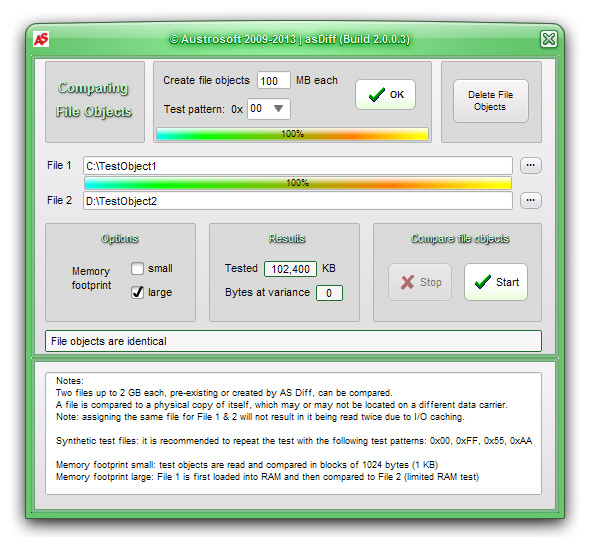
AS DiffWhen a brand-new main board caused random errors copying larger files (over ~30MB), we needed more evidence to underpin our warranty claim.
AS Diff was quickly written and it promptly caught the mainboard in the act. After copying a ~500MB file to disk, then loading it back into memory and comparing it with the original, AS Diff reported over 130 bytes that had changed in the process.
AS Diff can generate identical test objects < 2GB each on external data carriers before making the comparison, or it can use pre-existing file objects. Generated file objects can be filled with bytes 0x00, 0x05, 0x0A, 0xFF.
AS Diff has an option that changes the memory footprint of one test object from small (one I/O block) to large, allocating as much RAM as possible. Both modes should of course show identity between identical test objects; if they don't, faulty RAM may be the cause. If both modes produce errors, and with a variety of peripherals (as in our case), a central hardware problem is the most likely cause.
AS Diff does not attempt in-depth fault diagnosis, but quickly answers one question: is the suspicion of faulty hardware based on fact?
AS Diff needs no installation. Extract the zip-archive AS Diff.zip into any folder (e.g. on a thumb drive) and run ASDiff.exe from there.
Any PC running Windows XP and higher
Freeware: AS Diff is free software
File size: 2.3 MB
V. 2.0.0.3
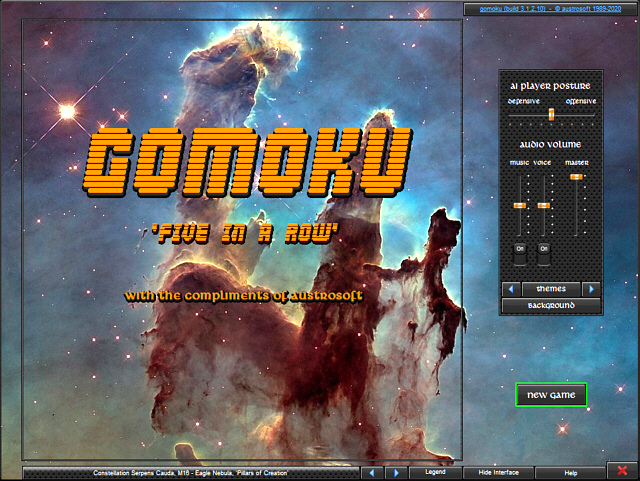
GOMOKU (Five in a Row)Vary the AI's playing style from aggressive to neutral, then to defensive and back - but don't expect an easy win. To paraphrase famous words, you are playing GOMOKU not because it is easy, but because it is hard!
The rules are deceptively simple: get five in a row before the computer does.
Let the computer show you how it's done by watching the AI play against itself.
GOMOKU is free software (freeware)
A PC running any version of MS Windows, from Win XP to Win 10, 32/64 bit.
A minimal vertical screen resolution of 768p.
Audio hardware (speakers) indispensable!
V. 3.1.2.10
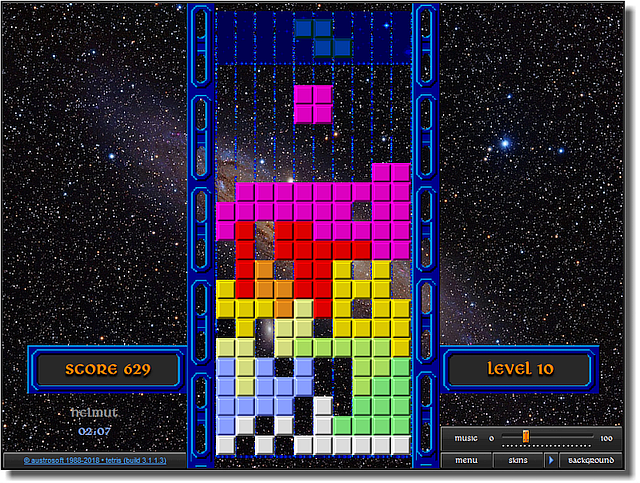
Tetris IIIGet the Austrosoft-version of this classic game while we are still giving it away...
Features:
up to 5 players can take turns, it's got a Top10 scoreboard, training mode, freeze mode etc.
Tetris is free software (freeware)
A PC running any version of MS Windows, from Win XP to Win 10, 32/64 bit.
A minimal vertical screen resolution of 768p.
Audio hardware (speakers) indispensable!
V. 3.1